TCP Working: 3-Way Handshake & Reliable Communication
Start With a Simple Question
What happens if computers send data without rules?
Imagine sending a long message in pieces:
Some pieces arrive late
Some arrive twice
Some never arrive
Some arrive in the wrong order
The receiver gets confused data.
This is exactly the problem the internet faced early on.
What Is TCP and Why It Is Needed
TCP (Transmission Control Protocol) is a set of rules that makes sure data is:
Delivered
Delivered in order
Delivered correctly
Simple definition:
TCP is a protocol that guarantees reliable communication between two computers.
Without TCP, most internet applications would break.
Problems TCP Is Designed to Solve
TCP exists to solve these real problems:
Data loss – packets may disappear
Out-of-order delivery – packets may arrive mixed
Duplicate packets – packets may arrive twice
Network congestion – network may be slow or overloaded
Unreliable connections – sender and receiver may not be ready
TCP handles all of this automatically.
Big Picture: TCP Connection Lifecycle
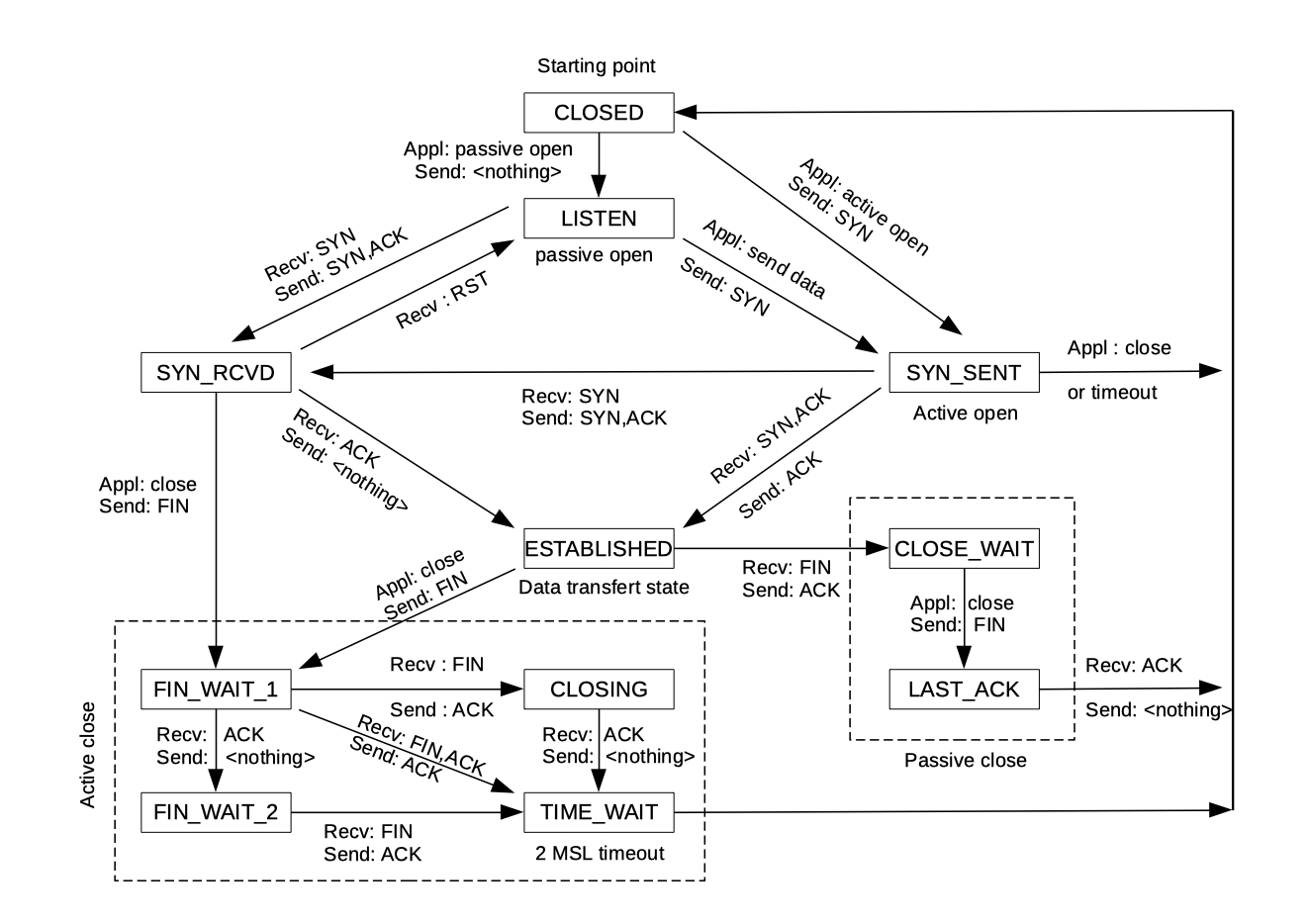
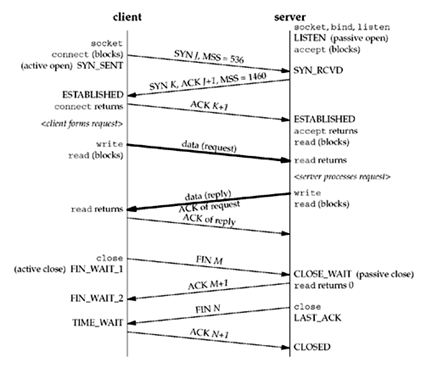
TCP has three main phases:
Connection setup
Data transfer
Connection close
What Is the TCP 3-Way Handshake
Before sending data, TCP first asks:
“Are you ready to talk reliably?”
This is done using the 3-Way Handshake.
Purpose:
Make sure both sides are reachable
Agree to start a connection
Synchronize communication
3-Way Handshake (Conversation Analogy)
Think of a phone call:
Client: “Can you hear me?”
Server: “Yes, I hear you. Can you hear me?”
Client: “Yes, let’s talk.”
Only after this does the conversation start.
Step-by-Step: SYN, SYN-ACK, ACK
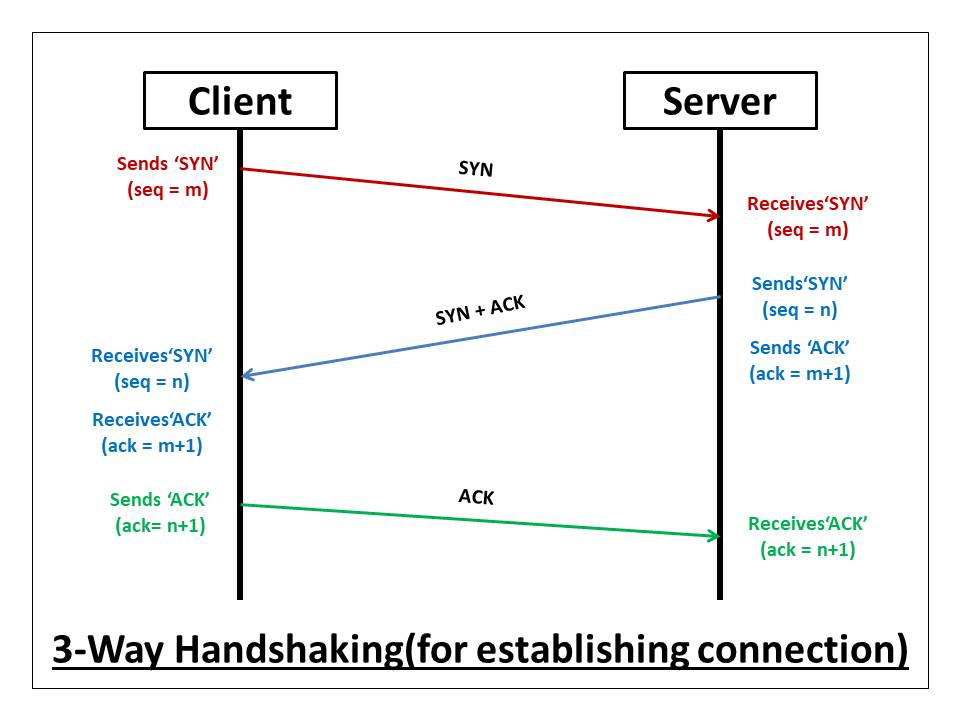
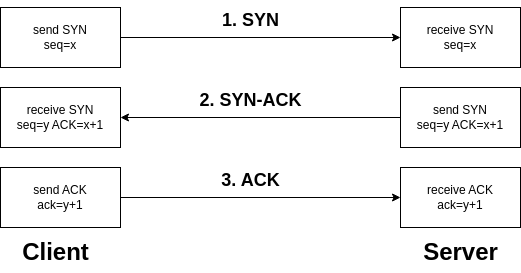
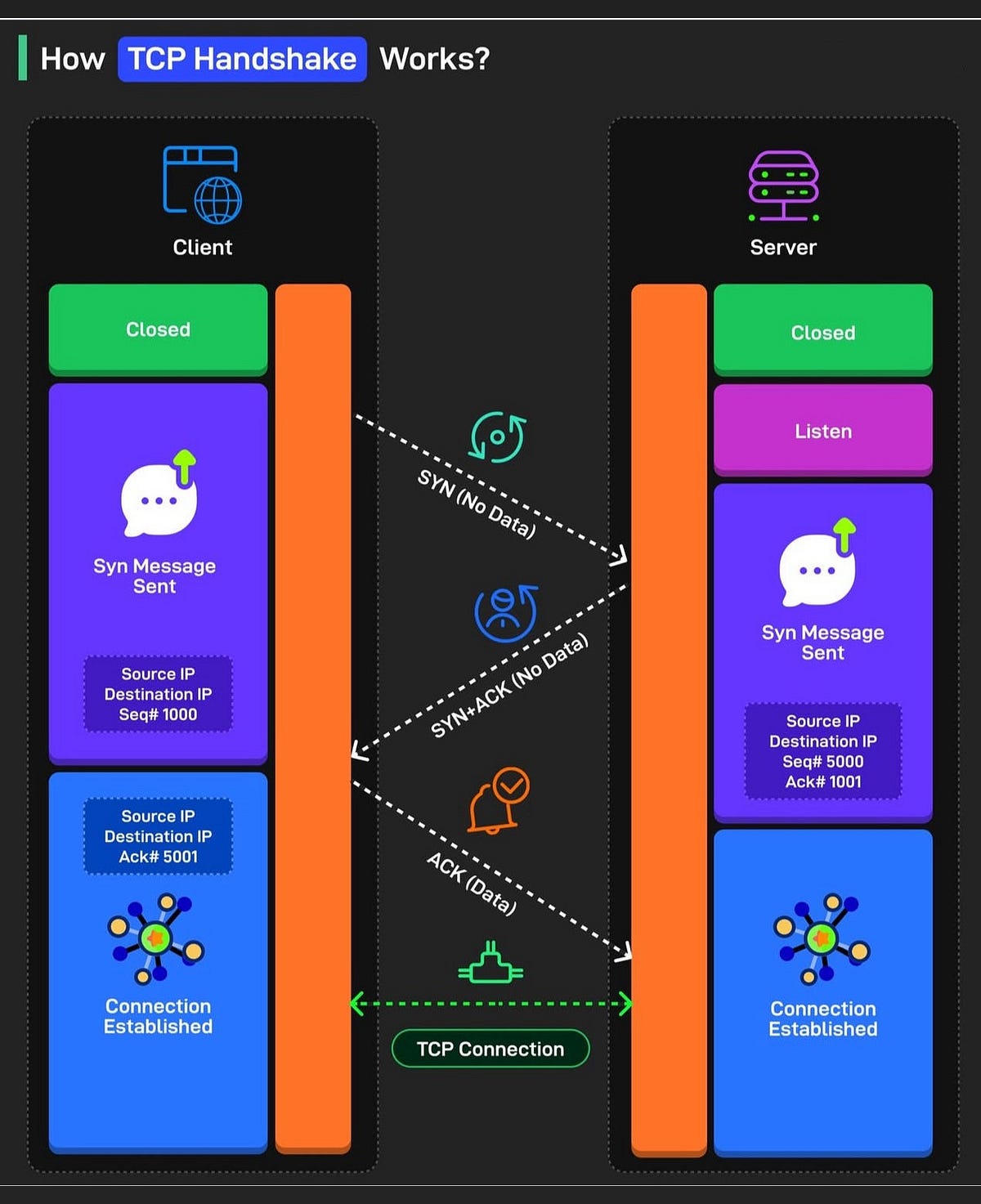
Step 1: SYN
Client → Server
“I want to connect.”
This packet is called SYN (synchronize).
Step 2: SYN-ACK
Server → Client
“I received your request, and I’m ready.”
This packet is SYN + ACK.
Step 3: ACK
Client → Server
“I received your response.”
Connection is now established.
Important:
No application data is sent before this completes.
How Data Transfer Works in TCP
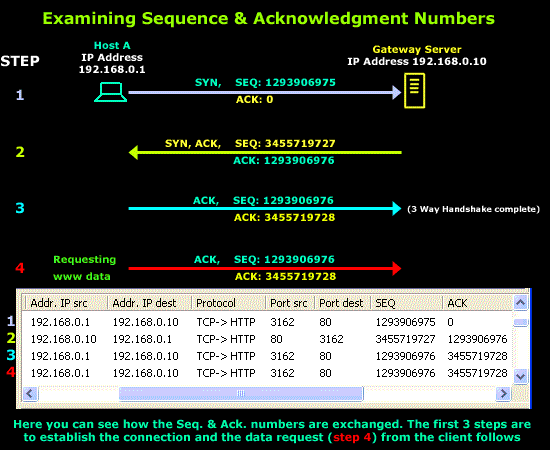
Once connected, TCP starts sending data in small pieces called segments.
Each piece has:
A sequence number
An expected acknowledgement
You don’t need exact numbers—just the idea.
Sequence Numbers (High Level)
Sequence numbers answer:
“Which part of the data is this?”
Example idea:
Packet 1 → bytes 1–100
Packet 2 → bytes 101–200
This allows the receiver to:
Reorder packets
Detect missing data
Acknowledgements (ACKs)
After receiving data, the receiver sends back:
“I got everything up to here.”
This ACK tells the sender:
What arrived successfully
What needs to be resent
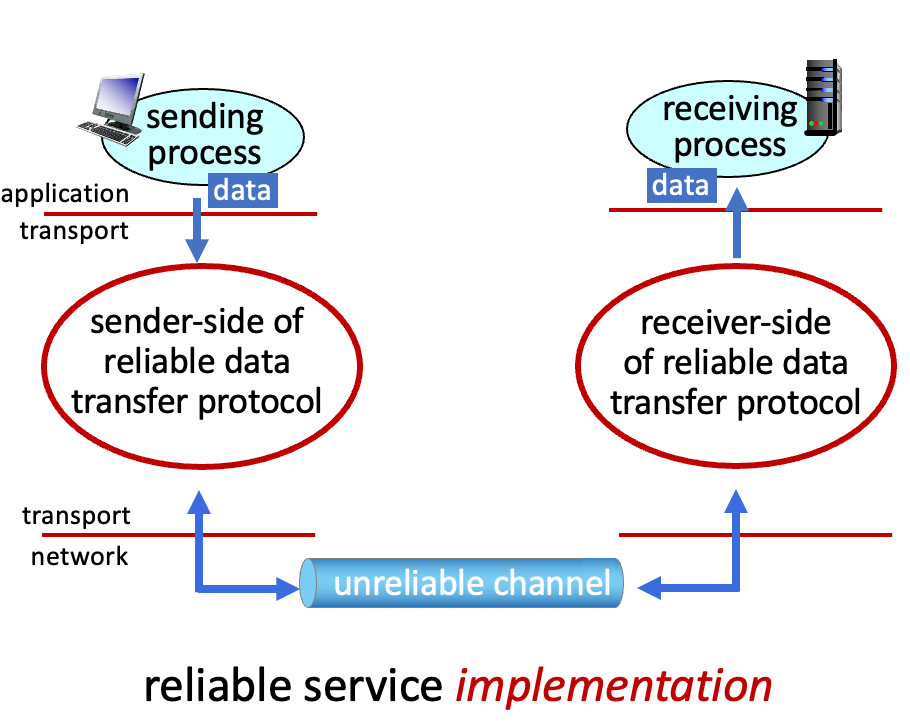
TCP Data Transfer Flow

How TCP Ensures Reliability, Order, and Correctness
1. Reliability
Lost packets are detected
Missing data is resent
2. Order
Sequence numbers allow reordering
Application receives data in correct order
3. Correctness
Checksums detect corrupted data
Corrupted packets are discarded and resent
All of this happens behind the scenes.
Packet Loss and Retransmission
What if a packet is lost?
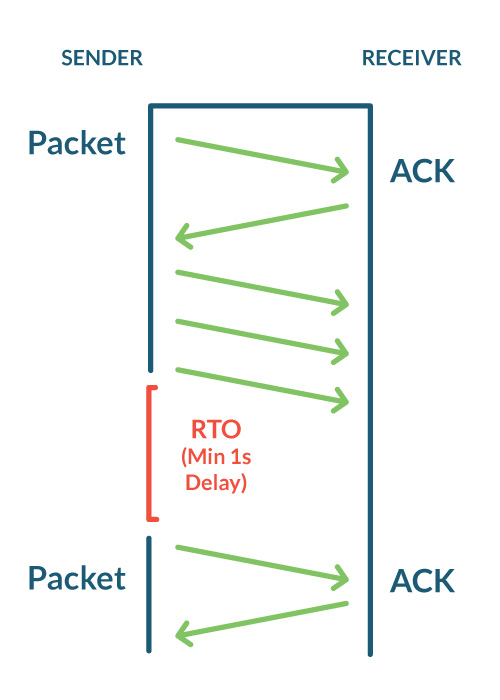
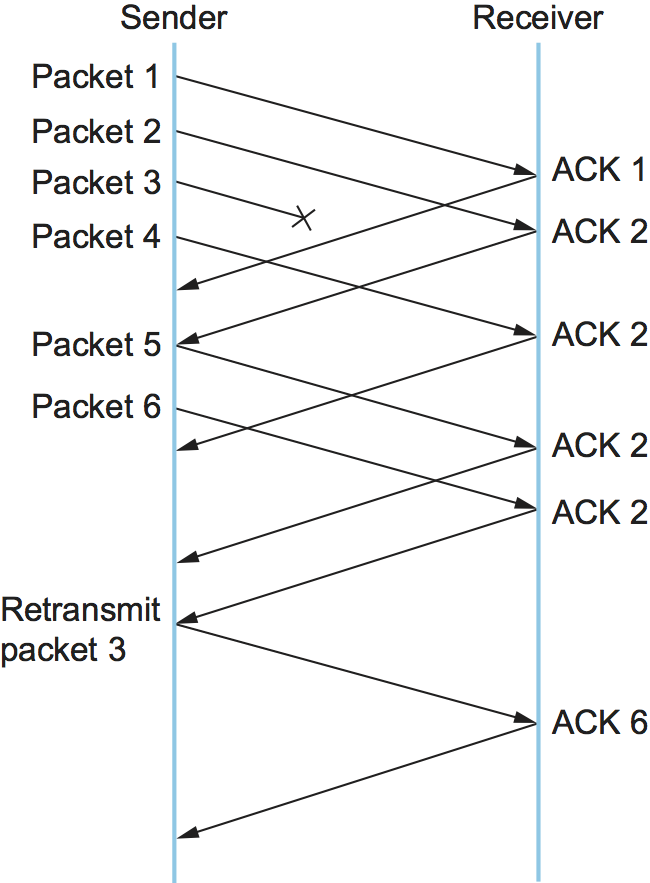
Flow:
Sender sends data
ACK is not received
Sender waits
Sender retransmits missing data
Application code never sees this complexity.
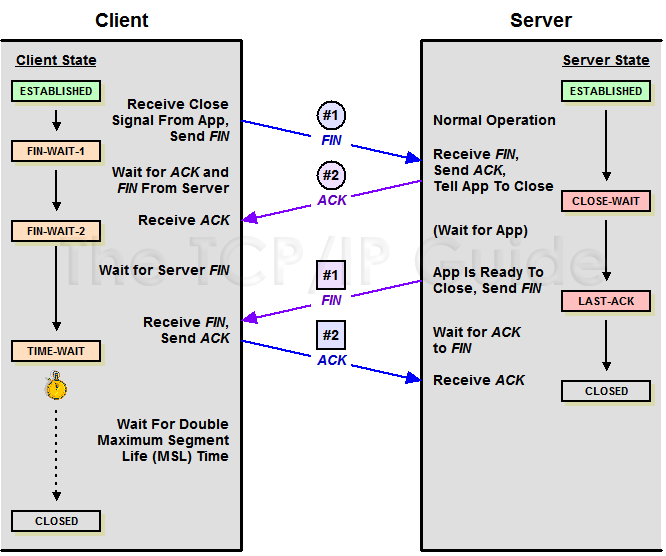
How a TCP Connection Is Closed
Closing a TCP connection is also controlled.
TCP does not just disappear.
Connection Termination (FIN and ACK)

Simple idea:
One side sends FIN → “I’m done sending”
Other side sends ACK
Other side sends FIN
First side sends ACK
Connection is now cleanly closed.
Why this matters:
Prevents data loss
Frees system resources safely
Key Mental Model (Keep This)
TCP is careful
TCP checks everything
TCP fixes problems automatically
TCP trades speed for correctness
That’s why TCP is used for:
HTTP / APIs
Logins
Payments
File transfers
Final Reassurance
You do not need to:
Memorize packet formats
Remember flags in detail
Know exact numbers
If you understand:
Handshake → Reliable transfer → Clean close
You understand TCP well enough to move forward.